
Instagram transcript not working?
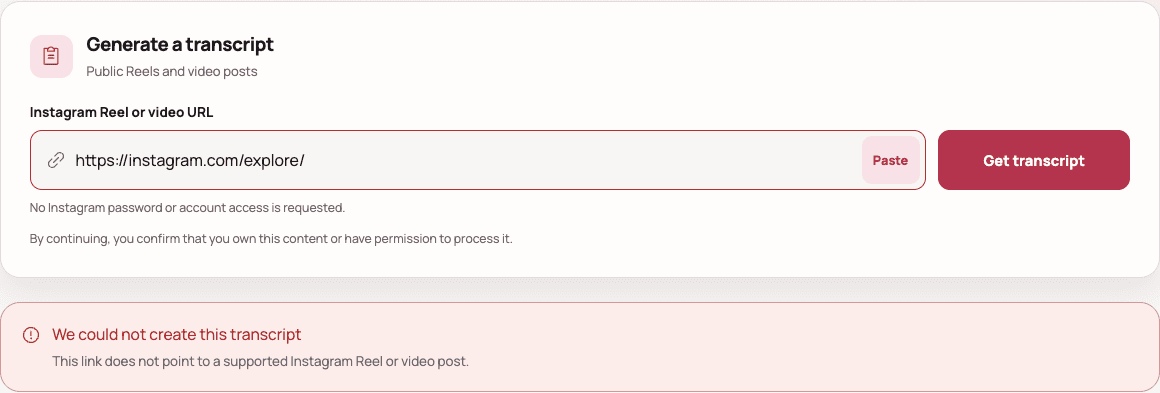
Start with the URL. Common causes include an unsupported page link, unavailable public access, missing speech, or a temporary transcription service problem.
Seeing “unable to transcribe, try again”?
Start by identifying where the error appears. A public Reel transcript, an Instagram voice message, and captions inside a video editor are separate tasks.
In this transcript tool
Use the error shown below the submitted link. If the link is rejected, copy the individual public Reel URL. If processing fails, check that the source contains speech. Retry a temporary service error once after waiting; repeated submissions do not fix an inaccessible source.
Inside an Instagram chat
This tool cannot open direct messages or voice notes. If a message cannot be transcribed in Instagram, listen to it there or ask the sender for the text. Do not paste private chat links or share account credentials here.
While adding subtitles
A readable transcript can exist without usable timing. TXT cannot become a timed subtitle file just by changing its extension. See how to import an SRT and check subtitle timing when you have a timed result.
Why is my Instagram transcript not working?
An Instagram transcript usually fails because the submitted address is not an individual supported video, the source is unavailable without a login, the audio contains no detectable speech, or the transcription provider is temporarily unavailable. The correct fix depends on which stage failed.
Fix the link
- The URL is incomplete or rejected immediately
- Copy a fresh link from the individual Reel or video post. Include https:// and the instagram.com host.
- The URL opens a profile, Explore, hashtag, or audio page
- Open the individual video first. The address should contain /reel/, /p/, or a legacy /tv/ path followed by its shortcode.
Check access
- The video is private or requires an Instagram login
- The transcript generator cannot bypass account privacy, age gates, login requirements, or regional controls.
- The Reel could not be found
- Open the link in a private browsing window. It may have been deleted, restricted, renamed, or made unavailable in your region.
Inspect the source
- The result says no transcript or no speech
- Listen to the source. Silent clips, music-only videos, and speech hidden by loud audio may not produce usable text.
- The service is busy or temporarily unavailable
- Keep the same link, wait a moment, and retry. A temporary provider error does not mean the Instagram URL is invalid.
Check the Instagram link format first
Use the address for one public Reel or video post, not the address for a creator, topic, sound, or feed. A supported link normally follows one of these patterns:
https://www.instagram.com/reel/SHORTCODE/https://www.instagram.com/p/SHORTCODE/https://www.instagram.com/tv/SHORTCODE/Do not submit these page types
- A creator profile or profile tab
- An Explore, hashtag, or search page
- An audio page without a single video
- A private, deleted, or login-only post
Check the problem in this order
Work from the link to the source, then to the transcription service. This avoids retrying a request that can never succeed.
Copy the individual video link
Open the Reel or post itself and use Share, then Copy link.
Test public access
Open the copied URL in a private browsing window without signing in.
Listen for spoken audio
Confirm that a clear voice is audible and not hidden by music or noise.
Retry only temporary failures
Wait briefly when the message says the service is busy or unavailable.
Use another public video when needed
Private, deleted, unsupported, and speech-free sources require a different link.
Instagram transcript troubleshooting FAQ
Direct answers about public access, private posts, shared links, and retries.
What does 'unable to transcribe, try again' mean on Instagram?
First check where the message appears. An error inside an Instagram direct message or its own caption editor belongs to Instagram. This website cannot access private chats or repair the app. For a public Reel submitted here, check the direct link and audible speech; retry only if the tool marks the error as temporary.
Why does a public Instagram Reel still fail?
Public in the Instagram app does not always mean available to a logged-out transcription service. Age limits, regional restrictions, temporary Instagram responses, deleted media, and provider errors can still prevent access.
Can I fix a private Reel by logging in here?
No. Do not submit an Instagram password, cookie, or private access token. This tool only processes supported links that are publicly accessible to the transcription provider.
Should I remove tracking parameters from a shared link?
You do not need to remove them manually. The generator validates the content path and reduces a supported URL to its canonical Reel, post, or legacy video address before processing.
When should I retry the same URL?
Retry the same URL only for a busy, rate-limited, or temporarily unavailable service. A private, deleted, unsupported, or speech-free source normally requires a different public video instead.