
How to transcribe an Instagram video.
Paste a public video link, review the spoken words, then save the transcript. Follow the steps below for help.
Generate a transcript
Public Reels and video posts
The short answer: copy the direct link to a public Instagram Reel or video post, paste it into the tool above, and select Get transcript. Listen back to check the result, then use Copy or TXT. SRT and VTT are available when the result includes usable timestamps.
Copy the link to one video.
Start at the individual Reel or video post. A creator profile, audio page, or hashtag page does not identify the video you want to transcribe.
- On your phone
- Open the video in Instagram and use its sharing or more-options menu to copy the link. Switch to your browser and paste it into the field above. Menu labels can vary with the Instagram app version.
- On desktop
- Open the individual video in a browser. Copy its direct address, or use the post's copy-link action if it opens in an overlay. Paste that address into the tool.
Reel links contain /reel/ or /reels/. A video post may use /p/. The link must lead to a video with speech; a photo post does not become transcribable just because its address uses /p/.
The video must be publicly accessible to the service. Being able to watch it inside your logged-in Instagram account does not guarantee the service can open it.
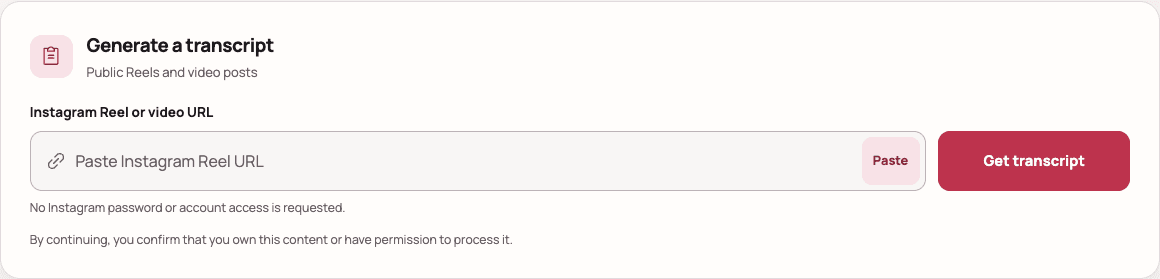
Paste the link and get the spoken words.
- Paste the complete URL into Instagram Reel or video URL.
- Select Get transcript and keep the page open while the video is processed. Wait for the current attempt before submitting again.
- When the result is ready, read the transcript beside the original video. The tool returns speech in the detected language; it does not translate it.
You do not need visible captions on the Reel. Transcription follows audible speech. Written descriptions and silent text overlays are different sources; use the guide to copying Reel text for those.
Check the words before saving.
Listen to the original while reading the result. Replay names, amounts, dates, and quoted statements. Music, accents, and overlapping voices can cause omissions or incorrect words. Mark unclear passages rather than guessing.
Keep the original transcript separate from your corrections. If you shorten it into notes or rewrite a sentence, label that version so it is not mistaken for a verbatim quote.
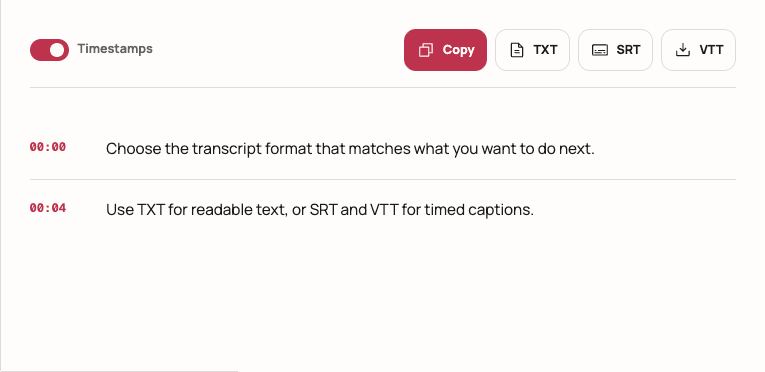
- Copy or TXT
- Use for reading, notes, or a text document. Save the source URL beside the words so you can return to the original.
- SRT or VTT
- Use for timed caption workflows. These exports require timing for every segment and stay disabled when timing is missing.
See how to download TXT, SRT, or VTT for format details. To work with the hook and structure of the speech, continue to the Reel script guide.
You can also transcribe by hand.
For a short clip or an unclear phrase, manual listening can be useful. Open the original video and a text note side by side, listen to a short passage, pause, and type what you hear. Replay it to check the wording before moving on.
If subtitles are visible, use them as a reference and compare them with the audio. They may abbreviate speech or omit a sentence. Manual listening can correct a transcript, but it cannot recover speech that is absent or inaudible.
Check the cause before retrying.
- Invalid link: copy a fresh URL from the individual Reel or video post.
- Private, deleted, or restricted video: the service cannot bypass access controls. Your logged-in view may have different access.
- No speech detected: confirm the clip contains an audible voice. Music-only content may have no transcript.
- Busy or temporarily unavailable service: wait before retrying. Repeated submissions do not resolve an access restriction.
For specific error messages, follow the Instagram transcript troubleshooting guide. The tool does not accept Stories, private voice messages, screenshots, or uploaded files.
Questions about transcribing Instagram videos
Can I transcribe an Instagram Reel without captions?
Yes, if the public Reel is accessible to the transcription service and contains detectable speech. Visible subtitles are not required. A silent clip or one with music alone may not produce a spoken transcript.
Can I transcribe an Instagram video on my phone?
Yes. Copy the direct video link in Instagram, open this page in your phone browser, paste the link, and select Get transcript. Review the result, then copy it or download TXT. No app installation is required.
Does the transcript include the post caption or text on screen?
The transcript follows spoken audio. It does not extract the creator's written post caption, comments, stickers, or text shown only in the picture. Those words need a separate text-copying or image-recognition method.
Can I transcribe a private video or an Instagram voice message?
This tool accepts public Reel and video-post links. It cannot access private posts, Stories, direct-message voice recordings, or content that requires an Instagram login. It does not accept uploaded video or audio files.
Why can I download TXT but not SRT or VTT?
TXT only needs transcript text. SRT and VTT require a valid start time and duration for every speech segment. If the provider does not return usable timing, timed exports stay disabled. The tool does not invent subtitle timing.